
Enforcing Architecture in Rust: cargo arc check and Design-Pattern Validation
TL;DR —
cargo arc checkis a new Rust tool that validates module-level dependencies against explicit architecture rules. It plugs into CI, catches layer violations early, and works alongside (not instead of) DDD and hexagonal architecture. This article surveys the broader ecosystem of architectural design-pattern checking tools across languages.
The Problem Architecture Solves (and Breaks)
Domain-Driven Design (DDD) and hexagonal (ports-and-adapters) architecture are both answers to the same question: how do I keep my codebase organized as it grows?
DDD says: model your software around the business domain. Bounded contexts, aggregates, value objects, domain events — these are structural concepts that should be visible in the code.
Hexagonal architecture says: separate the core domain logic from infrastructure and external concerns. The domain sits at the center, adapters plug in from the outside through well-defined ports.
Both approaches share a common enemy: architectural drift. Over months and years, dependencies creep in the wrong direction. A domain module starts importing from the UI layer. A use-case depends on a concrete database driver instead of an interface. The code still compiles, the tests still pass, but the architecture has quietly eroded.
The question is: how do you catch that drift before it becomes a problem?
Visualizing Dependencies with cargo arc
Before you can enforce architecture rules, you need to see the architecture. That’s where cargo arc’s visualization capabilities come in.
The Arc Diagram: cargo arc -o dependencies.svg
The simplest way to get started is to generate an SVG diagram of your workspace:
cargo arc -o dependencies.svg
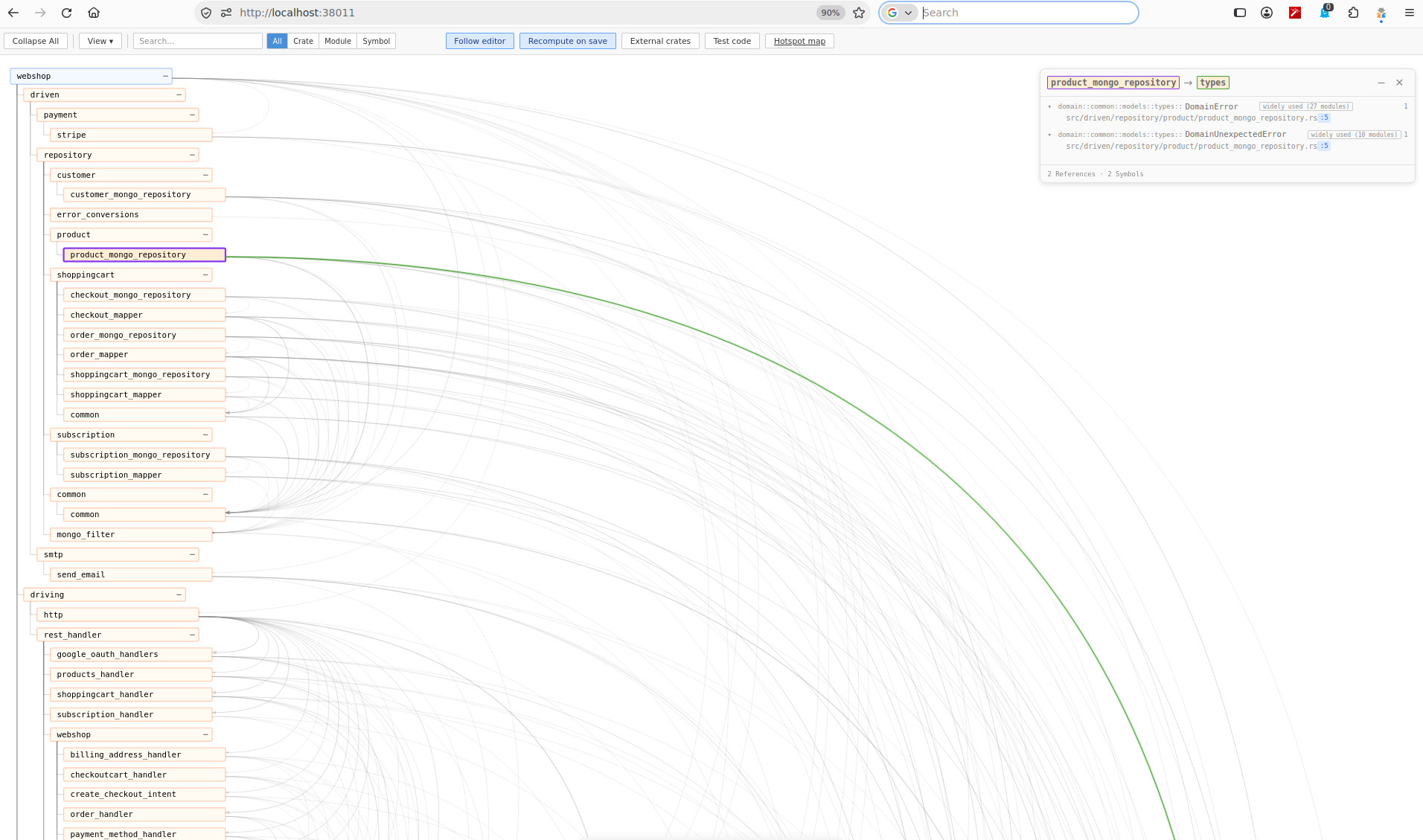
This produces a self-contained SVG file — no external resources, no network calls — that any browser can open. The diagram draws your workspace as a tree of crates and modules, with arcs tracing the use dependencies between them.
What you see:
- Blue boxes — crates
- Orange boxes — modules (nested hierarchically inside their crate)
- Gray boxes — external dependencies
- Arcs — dependencies between any two nodes, colored by type (crate dependency, module dependency, re-export, or circular edge)
The layout is inspired by Martin Wattenberg’s Arc Diagrams (IEEE InfoVis 2002), which use horizontal lines for nodes and arcs above or below to show connections. cargo arc adapts this into a tree structure, making it easier to see hierarchical relationships alongside cross-cutting dependencies.
Interacting with the diagram:
- Hover a node or arc to see its sidebar — dependents, dependencies, and the symbols crossing each relation
- Click to pin the sidebar open
- Double-click a node to collapse or expand it — collapsed nodes merge their children’s arcs into summary arcs
- Toolbar buttons collapse or expand the entire tree at once
- Search filters the diagram by substring, with scope buttons for crates, modules, or symbols
- View menu toggles filters: show/hide crate dependencies, module dependencies, re-exports, and circular dependencies
You can also output an HTML page instead of a bare SVG — just name the file .html or .xhtml. The inline SVG behaves the same in a browser but keeps its size where a bare SVG would scale to fit, which is useful for editor webviews.
The Interactive UI: cargo arc ui
For a more interactive experience, cargo arc ui serves the diagram over HTTP:
cargo arc ui
This starts a local server that serves the arc diagram alongside a hotspot map — a circle-packed visualization that ranks files by lines of code times commits, showing which files are large and change often. The hotspot map and the arc diagram are linked: clicking a hotspot in the map highlights the corresponding node in the arc diagram.
Editor integration:
The UI supports bidirectional integration with editors via plugins for Neovim, VS Code, and RustRover:
- Follow editor — the diagram automatically selects the node of the file your editor is currently showing
- Jump to definition — clicking a node or reference in the diagram opens the file in your editor
- Recompute on save — writing a
.rsorCargo.tomlfile triggers a fresh analysis and reloads the diagram, keeping your zoom and selection
This makes cargo arc ui a live architecture dashboard: as you navigate your code, the diagram updates in real time, helping you understand the impact of changes before you make them.
Arc diagram:
Hotspot diagram:
Hotspot Analysis: cargo arc hotspots
For a quick overview of maintenance risk, cargo arc hotspots renders a circle-packed map to stdout or a file:
cargo arc hotspots -o hotspots.svg
Each circle represents a file. Circle size is proportional to lines of code; color intensity reflects commit frequency. Large, dark circles are your hotspots — the files that usually cost the most to maintain.
When to Use Which
| Mode | Best for |
|---|---|
cargo arc -o deps.svg |
Sharing architecture with teammates, embedding in docs, quick one-off inspection |
cargo arc ui |
Active development — live feedback as you navigate code, editor integration |
cargo arc hotspots |
Identifying maintenance risk, planning refactoring priorities |
cargo arc check |
Enforcing rules, CI gates, preventing architectural drift |
cargo arc check: Architecture Rules for Rust
cargo arc is a Rust tool that does two things:
- Visualizes a Cargo workspace as an arc diagram — crates and modules drawn as boxes, with arcs tracing
usedependencies between them. - Checks that workspace against architecture rules you write in a TOML file, failing the build when rules are violated.
The second part — cargo arc check — is the focus here.
How It Works
You write rules in arc-rules.toml next to your workspace’s Cargo.toml. The tool analyzes every module in your workspace (resolving use statements) and checks them against your rules. If a rule is violated, cargo arc check exits with a non-zero code, making it trivially integrable into CI.
By default, a workspace without any rules file is checked against a single rule: no circular dependencies between modules. That’s it. You get immediate value without writing a single line of configuration.
Rule Types
cargo arc check supports three rule types:
1. Layers
Define your architecture layers and their allowed dependency direction:
[[rules]]
type = "layers"
name = "architecture layers"
layers = [["cli", "storage"], "services", "core"]
direction = "top-down"
This says: cli and storage are top-level layers, services sits below them, and core is the foundation. Dependencies may only flow downward — cli can depend on services and core, but core must never depend on services.
Two crates in the same layer (like cli and storage) are unordered — dependencies between them are permitted. Use exhaustive = true to ensure every crate is placed in a layer, catching build-tooling crates and other outliers.
2. Forbidden Dependencies
Ban specific cross-layer imports:
[[rules]]
type = "forbidden-dependency"
name = "no services in storage"
from = "storage"
to = "services"
This catches the case where a storage module imports from services, even if the layer rule above would technically allow it. forbidden-dependency checks direct edges only — it looks at imports between modules matching the from pattern and modules matching the to pattern.
3. No Cycles
Explicitly declare which module scopes must be acyclic:
[[rules]]
type = "no-cycles"
name = "no cycles"
scope = "**"
allow = [
  { from = "**", to = "super", reason = "children read the parent's vocabulary" },
]
The scope defines where cycle detection runs. The allow list lets you tolerate specific patterns — like a child module importing from its parent (super), which is idiomatic Rust but technically a cycle.
The Baseline Workflow
Real-world codebases rarely pass architecture checks on the first run. cargo arc check handles this with a baseline file (arc-baseline.toml):
cargo arc check --generate-baseline
This freezes the current violations. From then on, the check passes as long as no new violations are introduced. As you fix violations over time, you regenerate the baseline to shrink the frozen debt.
CI Integration
# .github/workflows/architecture.yml
name: Architecture Check
on: [push, pull_request]
jobs:
  check:
    runs-on: ubuntu-latest
    steps:
      - uses: actions/checkout@v4
      - uses: dtolnay/rust-toolchain@stable
      - run: cargo install cargo-arc
      - run: cargo arc check
Exit code 0 means the architecture is clean. Exit code 1 means a rule was violated. Exit code 2 means the tool itself failed (bad config, analysis error).
What It Doesn’t See
cargo arc check analyzes the union of all #[cfg] configurations — it doesn’t evaluate feature flags at runtime. A module behind #[cfg(feature = "hydrate")] is included regardless of which features are active. This means the tool can report dependencies that exist in no single build, though in practice this is rare and the conservative approach is usually correct.
Module declarations inside macros are also not analyzed. If your code uses feature_gate! { pub mod runtime; }, the runtime module won’t appear in the graph.
Applying cargo arc check to DDD
Domain-Driven Design introduces structural concepts that map naturally to architecture rules:
Bounded Contexts as Layers
In DDD, a bounded context defines a clear boundary around a specific domain model. In cargo arc check, each bounded context can be a layer:
[[rules]]
type = "layers"
name = "bounded contexts"
layers = ["billing", "inventory", "shipping", "shared-kernel"]
direction = "top-down"
The shared-kernel layer at the bottom holds models and utilities that are intentionally shared. Contexts above it may depend on the kernel but not on each other — that’s the whole point of bounded contexts.
Aggregate Boundaries
Aggregates are consistency boundaries within a bounded context. A forbidden-dependency rule can enforce that an aggregate’s internal modules don’t leak into other aggregates:
[[rules]]
type = "forbidden-dependency"
name = "order aggregate isolation"
from = "billing::order"
to = "inventory::product"
This catches the common mistake where the billing layer reaches directly into inventory data instead of going through a domain event or a port.
Domain Events as the Only Cross-Context Channel
DDD prescribes that bounded contexts communicate through domain events. A forbidden-dependency rule can enforce this:
[[rules]]
type = "forbidden-dependency"
name = "cross-context via events only"
from = "billing"
to = "shipping"
If billing needs to signal something to shipping, it must publish a domain event, not call a shipping method directly. The rule catches direct imports; the event mechanism lives in the shared kernel or a messaging infrastructure layer.
Applying cargo arc check to Hexagonal Architecture
Hexagonal architecture (also known as ports-and-adapters) has a very clear dependency direction: everything depends inward toward the domain.
The Classic Layer Model
[[rules]]
type = "layers"
name = "hexagonal layers"
layers = ["adapters", "application", "domain"]
direction = "top-down"
- Adapters — UI, HTTP endpoints, CLI, database drivers, external APIs
- Application — use cases, orchestration, command handlers
- Domain — entities, value objects, domain services, repositories (interfaces only)
Dependencies flow from adapters → application → domain. The domain depends on nothing.
Ports as Module Boundaries
In hexagonal architecture, ports are traits defined in the domain layer that adapters implement. A forbidden-dependency rule can ensure adapters never import domain implementation details:
[[rules]]
type = "forbidden-dependency"
name = "adapters only see ports"
from = "adapters"
to = "domain::impl"
The domain::impl pattern catches any module under domain::impl — the concrete implementations that adapters should never touch. They only see the port traits.
Repository Pattern Enforcement
The repository pattern is central to hexagonal architecture. The domain defines the repository interface; the adapter provides the implementation. A cycle between them is a classic architectural violation:
[[rules]]
type = "no-cycles"
name = "no domain-adapter cycles"
scope = "domain::**"
allow = [
  { from = "**", to = "super", reason = "children read the parent's vocabulary" },
]
If the domain imports from an adapter (to use a concrete repository type instead of the trait), this rule catches it.
Architecture Decision Records (ADR)
While tools like cargo arc check enforce architecture at build time, Architecture Decision Records capture architectural decisions at the point they’re made.
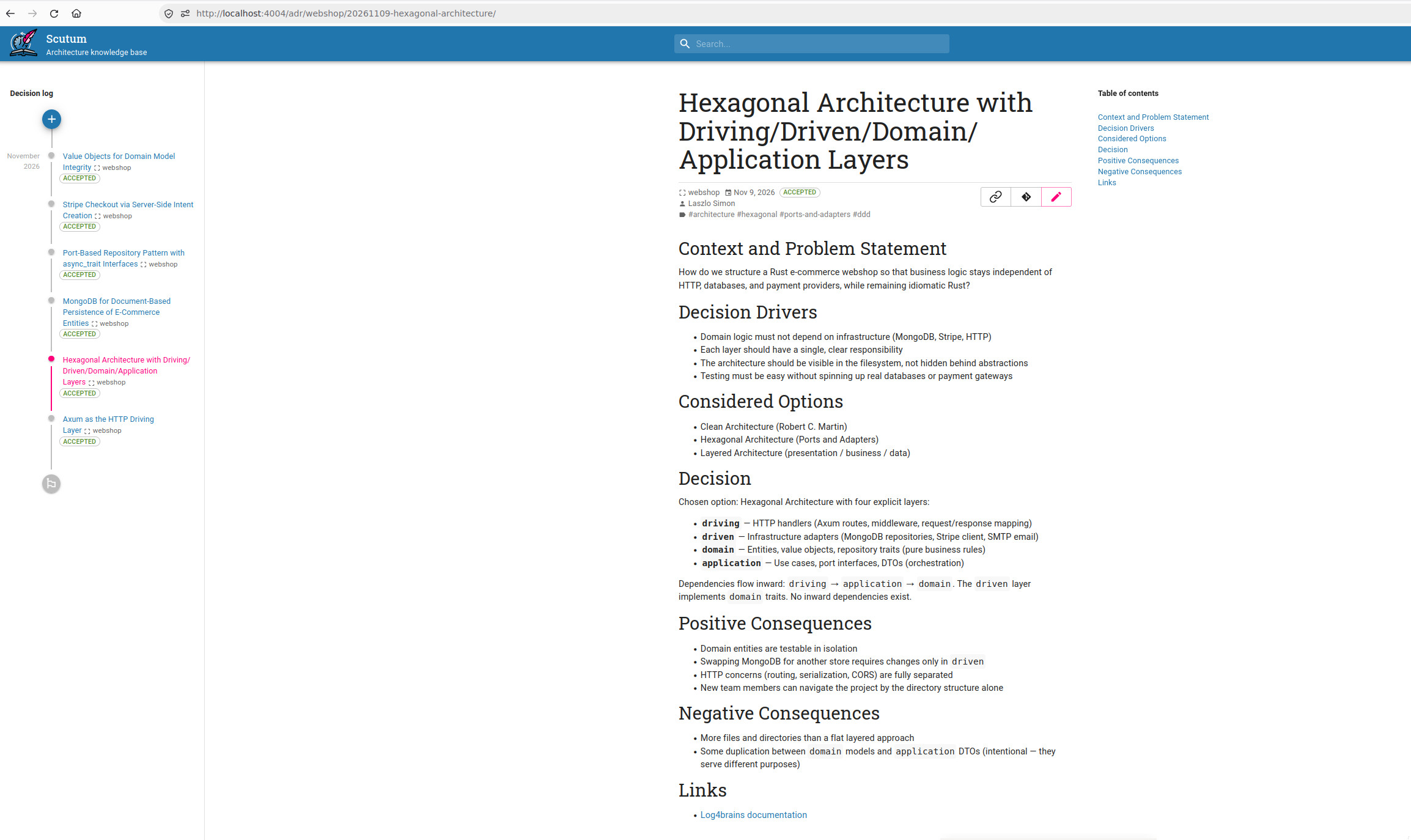
The adr-tools CLI (5,700+ stars) and log4brains (1,600+ stars) are the most popular ADR management tools. They don’t enforce rules — they document them.
The relationship between ADRs and automated checks is complementary:
- ADR — documents why a particular architecture was chosen
cargo arc check/ ArchUnit — enforces that the architecture is maintained
A well-maintained codebase has both: the ADR explains the rationale, and the automated check prevents drift from that rationale.
ADRs as Context for AI Agents
There’s another reason to maintain ADRs that’s become increasingly relevant: they serve as structured architectural context for AI coding agents.
When an AI agent contributes to a codebase, it needs to understand the project’s architectural constraints — which layers exist, what dependencies are forbidden, why certain patterns were chosen. Without that context, agents tend to make locally sensible but architecturally inconsistent changes: importing from the wrong layer, bypassing a port, or creating a new dependency where one already existed.
ADRs provide exactly that context. They’re written in plain Markdown, they’re version-controlled alongside the code, and they’re machine-readable. An AI agent can read an ADR and understand:
- What the architecture looks like (the layers, the boundaries)
- Why those boundaries exist (the trade-offs that were considered)
- What is forbidden and what is encouraged
Combined with automated checks like cargo arc check, ADRs create a feedback loop: the agent reads the ADR to understand the constraints, writes code that respects them, and the automated check verifies compliance. The ADR is the intent; the check is the enforcement.
For teams using AI agents in their workflow, treating ADRs as a first-class artifact — not just documentation, but operational context — pays dividends in both human and machine productivity.
ADR with log4brains:
Practical Advice for Getting Started
-
Start with the default —
cargo arc checkwithout any rules file already catches circular dependencies. Run it once and see what it finds. -
Add rules incrementally — Write one rule, run, read the output, freeze what you accept with
--generate-baseline, then add the next rule. Don’t try to model your entire architecture in one go. -
Use
--show-silenced— This flag lists frozen violations, so you can see how much debt remains and prioritize fixing it. -
Integrate into CI early — Even with a large baseline, having the check in CI means new violations are caught immediately rather than accumulating silently.
-
Pair with ADRs — Document your architectural decisions in ADRs. The automated checks enforce them; the ADRs explain why they exist.
-
Don’t over-constrain — Architecture rules should express genuine constraints, not preferences. Every rule that’s too broad becomes noise, and noise gets ignored.
Final Thoughts
cargo arc check fills a genuine gap in the Rust ecosystem: module-level architecture validation that works with Cargo’s workspace model. It’s not a silver bullet — no tool is — but it’s a powerful addition to the Rust developer’s toolkit, especially for projects that follow DDD or hexagonal architecture.
The broader lesson is that architectural enforcement is a first-class concern across all languages. Whether you’re using cargo arc check in Rust, ArchUnit in Java, or custom linters in Go, the principle is the same: document your architecture, automate its enforcement, and treat violations as bugs.
The code compiles. The tests pass. But if the architecture is wrong, the code is wrong. Tools like cargo arc check make that visible.